Build and Kill Zombies controls
In build mode the game prints its own key list on screen. Here it is word for word, including two keys a published guide describes differently.
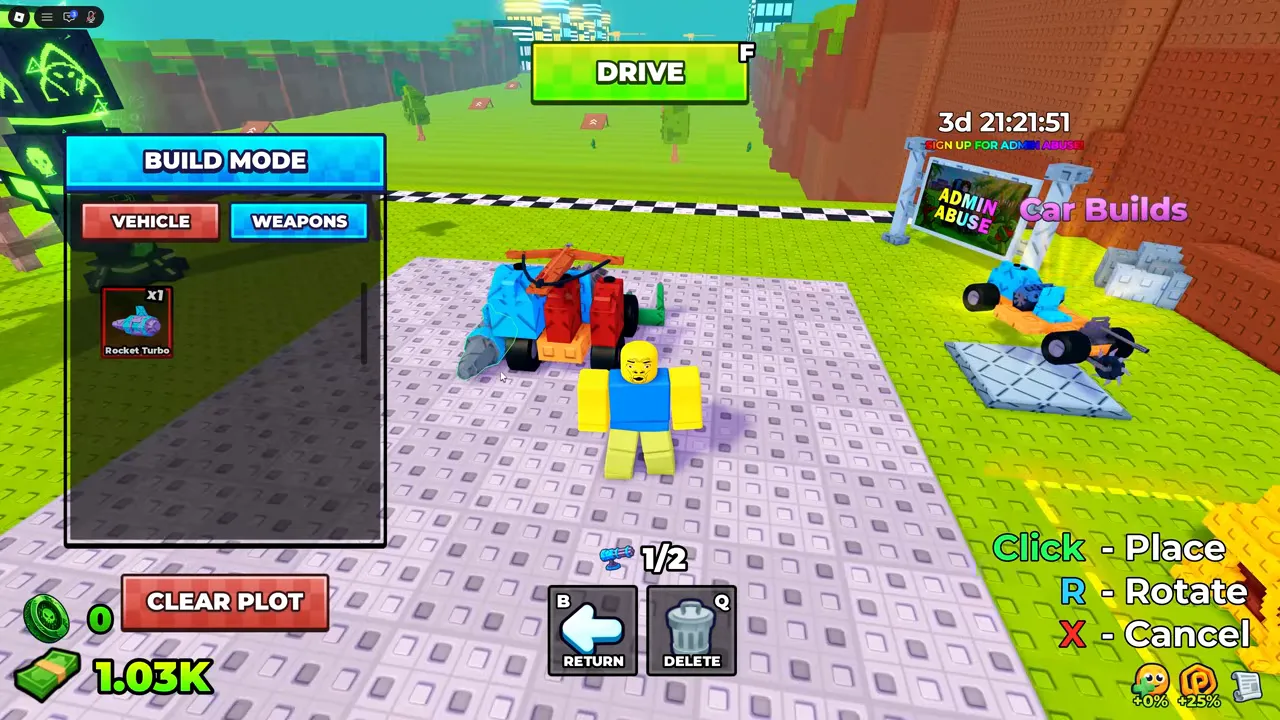
Build mode. VEHICLE and WEAPONS tabs, a CLEAR PLOT button, a counter reading 1/2, the prompt Click - Place, R - Rotate, X - Cancel, and two buttons lettered B (RETURN) and Q (DELETE).
Frame at 2:50 of I Built the STRONGEST CAR to SURVIVE.., recorded by Default — a player’s video, not an official image
Build mode
- Click
- Place
- R
- Rotate
- X
- Cancel
- B
- ReturnOne published guide calls this the key that opens build mode.
- Q
- DeleteOne published guide calls this a category picker.
- F
- Drive
- P
- parts menu
The same screen carries two tabs, VEHICLE and WEAPONS, a support counter, and a CLEAR PLOT button. Which parts move that counter, and where the parts come from in the first place.
Driving
The on-screen prompt lists no driving keys. One guide gives W and S to accelerate and reverse and A and D to steer, which is the standard Roblox vehicle layout; the mouse camera and scroll zoom are Roblox defaults too. None of it is printed in the game.
Roblox also lists this experience as supporting voice chat and camera, which is worth knowing before you join a five-player server.
Still undocumented
- Whether weapons fire on their own or need a button. The key list does not mention firing.
- Whether there is a horn, a boost, or a repair action.
- Controller and touch-screen bindings.